
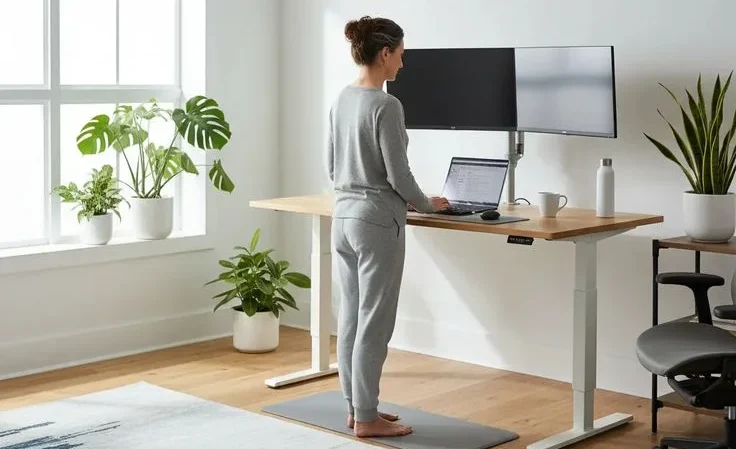

Neck and back pain from desk work has become one of the most common modern health complaints. Whether you work from home, in a corporate office, or run a business, long hours at a workstation can silently overload your spine. Creating the best desk setup for neck pain can significantly reduce strain and protect your spine.
The good news is that most desk-related pain is preventable with a properly designed ergonomic setup, smart movement habits, and structured posture support.
Read in detail: Complete Guide to Neck Pain: Causes, Symptoms, Exercises and Treatment
Why Desk Setup Directly Affects Neck and Back Pain
When you sit for prolonged periods in poor alignment:
- Forward head posture increases load on cervical spine structures
- Slouching flattens the lumbar curve and strains lower back muscles
- Elevated shoulders tighten upper trapezius muscles
- Static sitting reduces spinal disc nutrition and blood circulation
Every inch your head moves forward adds significant strain to the neck muscles. Over time, this creates chronic stiffness, headaches, and upper back discomfort.
Ergonomics reduces this strain by aligning your workstation with your body, not forcing your body to adapt to your desk.
Learn how posture affects neck pain and correction exercises in our article on Simple Posture Correction Exercises for Forward Head Posture
The Science Behind Desk Posture and Spinal Loading

Understanding why desk setup matters requires looking at how the spine responds to prolonged sitting and poor posture.
The human spine is designed for movement, not static loading. When you sit for long hours, especially with forward head posture or slouched shoulders, compressive forces increase on spinal discs.
Intervertebral discs rely on movement for nutrient exchange. Without regular motion, disc hydration decreases, stiffness increases, and discomfort follows.
Forward head posture is one of the most common contributors to neck pain. When the head shifts even a few centimeters forward, the cervical spine experiences significantly greater mechanical load.
This overload strains small stabilizing muscles in the neck and upper back, leading to muscle fatigue, trigger points, and chronic tightness. Over time, this can contribute to degenerative changes if not corrected.
Lumbar flexion, or slouching, also alters pressure distribution within spinal discs. Instead of evenly distributing load, slouched sitting increases posterior disc pressure.
Combined with weak core muscles and tight hip flexors, this creates a cycle of low back pain that worsens with prolonged sitting. Maintaining a neutral spine reduces this uneven stress and improves muscular efficiency.
Another overlooked factor is muscle endurance. Postural muscles are designed for low intensity sustained activity. However, modern sedentary lifestyles reduce their conditioning.
When these muscles fatigue, the body collapses into passive structures like ligaments and discs for support. This is when discomfort begins. Strengthening and endurance training of postural muscles is therefore just as important as ergonomic positioning.
Finally, movement variability is critical. Research in occupational health consistently shows that dynamic sitting, alternating positions, and microbreaks reduce musculoskeletal discomfort more effectively than static “perfect posture.” The body thrives on change.
Even the best ergonomic setup must be paired with movement to protect long-term spinal health.
Also Read: This 7 day knee strengthening exercise plan works like Miracle
Core Ergonomic Principles You Must Follow
Neutral Spine Alignment
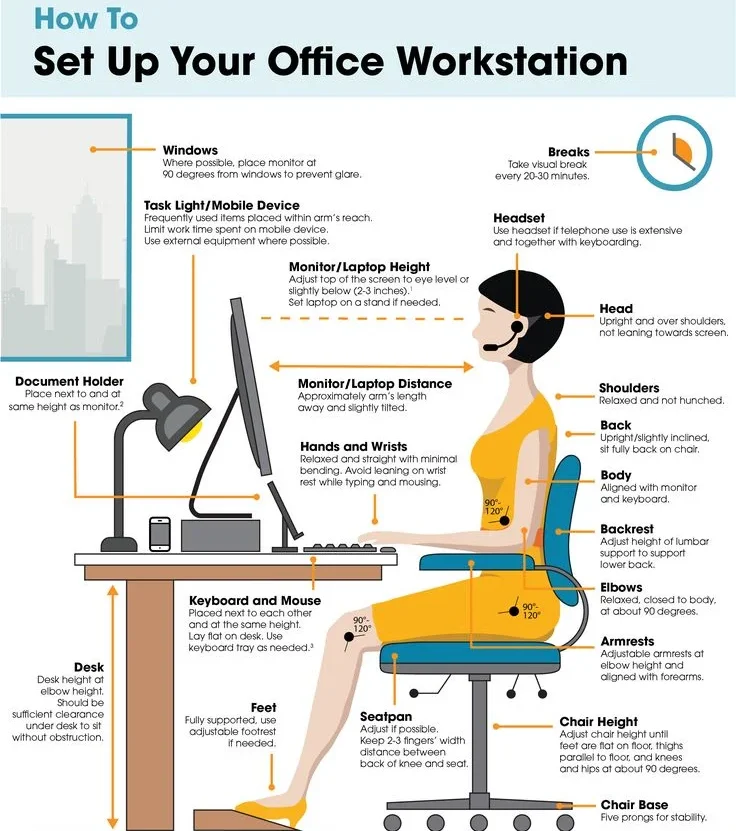
Your spine has natural curves in the neck, mid-back, and lower back. A neutral spine maintains these curves without exaggeration or flattening. Your ears should align over your shoulders, and shoulders over hips.
Elbow and Arm Position
Elbows should rest close to your body at approximately 90 degrees. Forearms should remain parallel to the floor while typing.
Screen at Eye Level
The top of your monitor should be at or slightly below eye level. This allows a natural downward gaze without bending your neck.
Movement Over Perfection
No posture is safe if held too long. The best posture is the next posture. Movement is essential.
Also Read: Simple Thigh Stretching Exercises for Knee Pain Prevention
Choosing the Best Chair to Reduce Back Pain
Your chair is the foundation of spinal support.
Features of a High-Quality Ergonomic Chair
- Adjustable seat height
- Adjustable lumbar support
- Adjustable armrests
- Recline and tilt mechanism
- Seat depth adjustment
- Breathable cushioning
Correct Chair Setup Steps
- Sit fully back into the chair.
- Adjust seat height so feet rest flat.
- Knees should be slightly lower than hips.
- Lumbar support should fit the curve of your lower back.
- Armrests should allow relaxed shoulders.
If your chair lacks lumbar support, use a lumbar cushion.
Also Read: 10 Minute Gentle Shoulder Mobility Routine at Home for Stiff and Painful Shoulders
Desk Height and Workspace Layout
Ideal Desk Height
Your desk should allow forearms to rest parallel to the floor. If the desk is too high, raise your chair and use a footrest. If too low, consider adjustable desks.
Leg Clearance
Keep under-desk space free to allow movement and avoid restricted posture.
Frequently Used Items
Keep keyboard, mouse, and frequently used items within easy reach to avoid repeated shoulder extension.
Learn About: The Ultimate Neck Stretch Routine for Desk Workers in 2026
Monitor Placement to Prevent Neck Strain
Correct monitor positioning prevents forward head posture.
Monitor Height
Top of the screen at or slightly below eye level.
Monitor Distance
Approximately an arm’s length away.
Monitor Angle
Tilt slightly backward so your eyes naturally look at the upper third of the screen.
Dual Monitor Setup
If using two monitors equally, center them both. If one is primary, place it directly in front and the secondary to the side.
Also Read: Child’s Pose Exercise for Back Pain Relief- A Complete Guide
Laptop Users: Critical Setup Requirements
Using a laptop alone almost always causes poor posture.
To fix this:
- Use a laptop riser
- Connect an external keyboard
- Use an external mouse
Never compromise neck height for keyboard position.
Also Read: Ultimate Guide to Home Physiotherapy for Back Pain
Keyboard and Mouse Placement
Keyboard Position
- Keep flat or slightly tilted downward
- Wrists neutral
- Avoid bending wrists upward
Mouse Position
- Keep close to keyboard
- Avoid reaching
- Consider ergonomic or vertical mouse if wrist pain exists
Small changes here dramatically reduce shoulder and forearm tension.
Also Read: Cat Cow Stretch Benefits for Back Pain- A Complete Guide
Sit-Stand Desk Strategy
Standing all day is not the answer. Alternating is.
Best Sit-Stand Schedule
- Start with 20 to 30 minutes standing each hour
- Gradually build to 40 to 60 minutes per hour
- Avoid standing longer than 90 minutes continuously
Standing Tips
- Use an anti-fatigue mat
- Wear supportive footwear
- Shift weight frequently
- Slightly bend knees, avoid locking
Movement matters more than posture.
Also Read: 10 Best Daily Stretches for Back Pain Relief at Home
Movement and Microbreak Protocol
2-Minute Microbreak Routine (Every 30 Minutes)
- Look 20 feet away for 20 seconds
- Roll shoulders 10 times
- Gentle neck side bends
- Stand and march in place
- Deep breathing
5-Minute Hourly Reset
- Walk around
- Stretch hip flexors
- Thoracic extension stretch
- Gentle hamstring stretch
Microbreaks reduce stiffness and improve focus.
Also Read: 15 Minute Full-Body Stretch To Relieve Your Stress- Proven Ways
Daily Strength Routine for Desk Workers
Weak postural muscles increase pain risk.
10-Minute Routine
- Chin tucks x10
- Scapular squeezes x15
- Glute bridges x15
- Hip hinges x10
- Plank hold 20 to 30 seconds
Consistency is more important than intensity.
Also Read: Knee-to-Chest Stretch for Bach Pain Relief and Spinal Flexibility- A Complete Guide
Reducing Eye Strain to Prevent Neck Pain
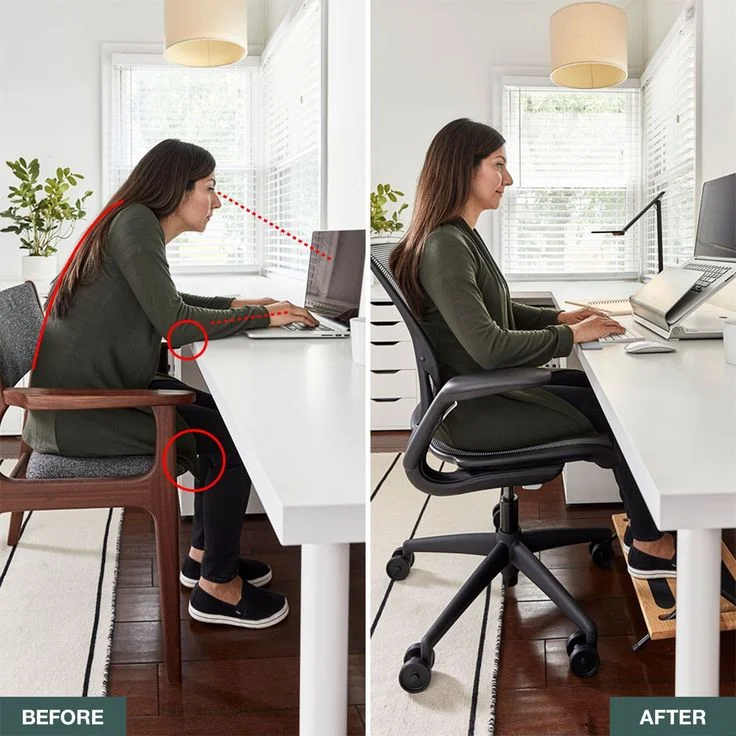
Eye strain often leads to leaning forward.
Follow the 20-20-20 rule:
Every 20 minutes, look 20 feet away for 20 seconds.
Reduce glare:
- Position monitor perpendicular to windows
- Adjust brightness to match room light
- Avoid overhead glare
Also Read: Spinal Twists for Lower Back Pain Relief- A Complete Guide
Advanced Ergonomic Upgrades
If you want next-level comfort:
- Adjustable monitor arm
- Split ergonomic keyboard
- Vertical mouse
- Footrest
- Under-desk walking pad
- Posture reminder app
Also Read: These Are the Best Home Exercises For Hip Pain Relief
Common Mistakes That Cause Pain
Screen Too Low
Leads to forward head posture.
Keyboard Too High
Causes shoulder elevation.
Sitting Too Long
Creates spinal compression.
No Lumbar Support
Encourages slouching.
Ignoring Pain Signals
Small discomfort becomes chronic pain if ignored.
Also Read: Straight Leg Raise for Knee Pain Relief: Benefits & How to Do It
Work From Home Specific Adjustments
Many people work from dining tables or sofas.
Avoid:
- Sitting on beds
- Using couch without back support
- Working long hours on coffee tables
Use:
- Dedicated desk
- Separate workspace
- Structured work hours
Environment influences posture behavior.
Also Read: Home Physiotherapy Exercises for Knee Pain That Actually Work
Lifestyle Factors That Influence Back Pain
Hydration
Supports disc health and muscle function.
Sleep
Poor sleep increases pain sensitivity.
Stress
High stress increases muscle tension, especially in neck and shoulders.
Physical Activity
Regular walking and strength training reduce long-term back pain risk.
Also Read: Bridge Exercise for Back Pain and Strengthening: A Complete Evidence-Based Guide
Warning Signs That Need Medical Attention
Seek professional help if you experience:
- Numbness or tingling
- Weakness in limbs
- Pain radiating down arms or legs
- Loss of bladder or bowel control
- Severe sudden pain
Also Read: Bird Dog Exercises for Back Pain Relief and Core Strengthening
4-Week Implementation Plan
Week 1
Set up chair and monitor. Add microbreaks.
Week 2
Introduce sit-stand routine.
Week 3
Add daily strengthening exercises.
Week 4
Refine setup and evaluate improvement.
Track pain levels weekly.
Also Read: How to Do a Pelvic Tilt Exercise for Lower Back Pain Relief
Long-Term Prevention Strategy for Desk-Related Neck and Back Pain
Creating an ergonomic desk setup is the first step, but long-term prevention requires a sustainable strategy.
Pain reduction is not only about equipment, but about habits, recovery, physical conditioning, and awareness. Sustainable spinal health depends on integrating these elements into daily routines.
First, develop posture awareness. Many people unknowingly drift into forward head posture or shoulder elevation during focused work.
Setting posture reminders, using wearable posture trackers, or scheduling regular reset alarms can significantly improve awareness. Over time, correct alignment becomes automatic rather than forced.
Second, incorporate strength training at least two to three times per week. Exercises targeting the glutes, deep core muscles, mid-back stabilizers, and neck flexors create structural support for long desk hours.
Stronger muscles improve load distribution and reduce strain on passive spinal tissues. Resistance bands and bodyweight exercises are sufficient if performed consistently.
Third, prioritize mobility. Tight hip flexors, hamstrings, chest muscles, and upper trapezius often contribute to poor desk posture.
Daily stretching or short yoga sessions can restore joint range of motion and counteract sitting stiffness. Improved mobility allows you to maintain neutral posture without feeling strained.
Fourth, optimize recovery outside work hours. Sleep quality directly influences pain perception and tissue repair.
A supportive mattress, proper sleep posture, and adequate rest allow spinal structures to recover from daily loading. Hydration and balanced nutrition further support tissue resilience and reduce inflammation.
Finally, adopt a long-term movement mindset. Aim for at least 7,000 to 10,000 steps daily if possible. Walking, swimming, cycling, or light recreational sports help maintain spinal mobility and muscular endurance.
Desk ergonomics is powerful, but combining it with regular physical activity dramatically lowers the risk of chronic neck and back pain.
Also Read: The Ultimate Neck Stretch Routine for Desk Workers in 2026
Complete Ergonomic Desk Setup Checklist
- Feet flat or supported
- Knees slightly below hips
- Lumbar support engaged
- Elbows at 90 degrees
- Shoulders relaxed
- Monitor at eye level
- Keyboard close
- Mouse within reach
- Microbreak timer active
Also Read: Effective Neck Pain Exercises At Home: A Complete Guide to Relief and Improved Mobility
Frequently Asked Questions (FAQ)
1. How high should my monitor be?
The top of the screen should be at or slightly below eye level.
2. Is standing better than sitting?
Alternating between sitting and standing is better than doing either alone.
3. How often should I take breaks?
Take a short break every 20 to 30 minutes to stretch or change posture.
4. Can a bad desk setup cause chronic pain?
Yes. Prolonged poor posture from an improper desk setup can contribute to chronic musculoskeletal pain.
Also Read: How to Understand What Really Causes You Pain?
Final Word
A proper desk setup is not about expensive equipment. It is about alignment, adjustability and movement. When you combine ergonomic positioning with consistent microbreaks and strengthening exercises, you significantly reduce the risk of neck and back pain.
Stay tuned with us for more health related topics.
Follow us on LinkedIn and Instagram for more.
More Read


Medical Disclaimer!
This article has been reviewed and written under the guidance of our Head Physiotherapist, Dr. Kruti Raj (PT, MUHS,CPT,CMPT). The information shared is intended for educational purposes only and should not be considered a substitute for personalized medical advice, diagnosis, or treatment.
Please consult us or any other qualified healthcare professional before beginning any exercise program, especially if you are experiencing pain, recovering from injury, or managing a medical condition.


